
Delete, reorder and rotate PDF pages on your phone
To delete a page from a PDF on Android, open the file in Kyneto PDF, tap All tools and choose Manage Pages. Tap the thumbnails you want gone, tap delete, then export. The same screen reorders pages by dragging and rotates a sideways scan with the rotate buttons. It all happens on the phone.
A scanner app saved the pages in the wrong order. Page two came out upside down. The form wants one page and you have six. These are two-minute jobs that somehow end up on a laptop.
Work on the pages, not the document
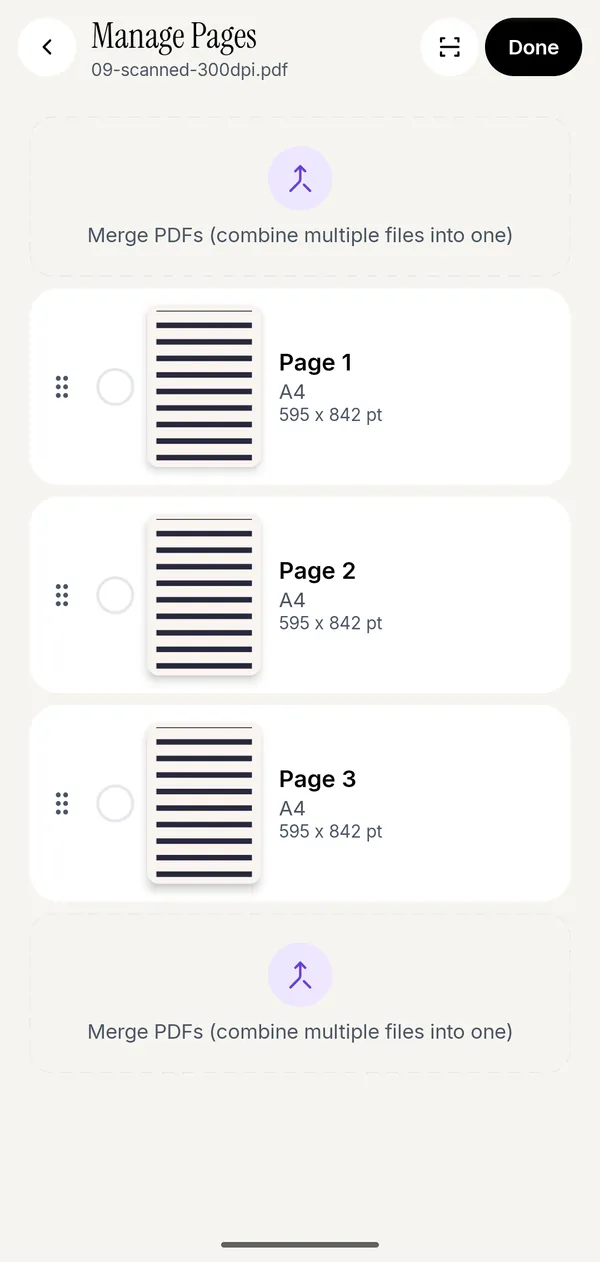
- Open the PDF and tap All tools, then Manage Pages under Pages.
- Tap a thumbnail to select it. Keep tapping to select more; the header counts them.
- Delete removes the selected pages from the draft. At least one page has to remain.
- Rotate left and Rotate right turn the selected pages 90 degrees at a time.
- Press and drag a thumbnail to move it. The order in the grid is the order in the finished file.
- Go back and export. The original file on disk is untouched until you do.
Because deletes and rotations apply to everything you have selected, a 40-page scan where every other page is upside down takes one pass, not twenty.
Insert pages instead of starting again
The same screen adds pages as well as removing them. Select a single page and the insert options appear:
- Images before or after the selected page, for the receipt you photographed afterwards.
- Blank page before or after, for the "this page intentionally left blank" that the printer wants.
Scan Pages inserts pages straight from the camera, at the start, at the end, or after a page you choose. That is how you add a signature page to a contract you were sent, without rebuilding the document.
Deleting versus extracting versus splitting
Three different jobs that people describe with the same words:
| You want | Use | Result |
|---|---|---|
| This document, minus some pages | Manage Pages → delete | One file, shorter |
| Only pages 4 to 7, as their own file | Manage Pages → extract pages | A new file, original untouched |
| Each chapter as a separate file | Split PDF | Several files |
If the form said "upload page 1 only", you want extract. There is more on the distinction in splitting a PDF or extracting pages.
Rotation that sticks
A page rotated in Manage Pages is rotated in the exported PDF, not just on your screen. Some viewers let you spin a page for reading and quietly forget it when you share the file, which is how a sideways page arrives at the other end anyway. Export after rotating and check the result once; it takes five seconds and saves an email.
If the page is sideways because the scan itself is sideways, rotating fixes it. If the content is sideways inside an upright page, rotating turns the whole page and you end up with a landscape document. Crop pages is the tool for trimming a bad scan down to the part that matters.
Fewer pages, smaller file
Deleting pages is the most effective compression there is. A six-page bank statement where the form only wants the first page is six times larger than it needs to be, and no compression setting beats simply not including the other five. If it is still too big afterwards, compress it to a size you type.
Questions people ask
How do I delete a page from a PDF on my phone?
Open the PDF in Kyneto PDF, go to All tools → Manage Pages, tap the pages you want to remove, tap delete, then export. The change is written into the exported copy.
Can I reorder PDF pages on Android?
Yes. In Manage Pages, press and drag a thumbnail to its new position. The grid order becomes the page order in the exported file.
How do I rotate one page of a PDF?
Select just that page in Manage Pages and tap Rotate left or Rotate right. Selecting several pages rotates them all at once.
Does deleting a page make the file smaller?
Yes, and usually by more than compression would. The content of that page is no longer in the document.
Can I get a deleted page back?
Not from the exported file. The original stays on disk until you overwrite it, so export to a new copy if you might need the full version later.
Does any of this need an internet connection?
No. Page editing runs entirely on the phone and works in aeroplane mode.
Free to download. No account, nothing uploaded.